
Controlling Access to EA
In the dynamic world of automated trading, having control over who can access and replicate your trading strategies is crucial. The “EA to cBot Bridge” is a sophisticated solution that facilitates the seamless copying of trades from the MT4/5 platform to the cTrader platform. This allows traders to use Expert Advisors on MT4/5 and automatically mirror trades on the accounts of their subscribers using cTrader. Subscribers need to install a specially generated cBot to participate, while the “EA to cBot Bridge” handles the trade transmission and control.
The effectiveness of this system relies heavily on robust access control mechanisms. Ensuring that only authorized subscribers can copy trades is essential to maintaining the integrity and exclusivity of trading signals. This article explores how the “EA to cBot Bridge” provides comprehensive control over access through its “Active cTrader connections” tab, where all active connections can be monitored and managed efficiently.
How Control is Exercised
The “EA to cBot Bridge” offers a powerful control panel under the “Active cTrader connections” tab. This feature is crucial for signal providers who need to oversee and manage who is copying their trades. The tab displays all active connections, providing detailed information about each one. This visibility allows the signal provider to identify and manage connections based on several critical parameters.
Monitoring Active Connections
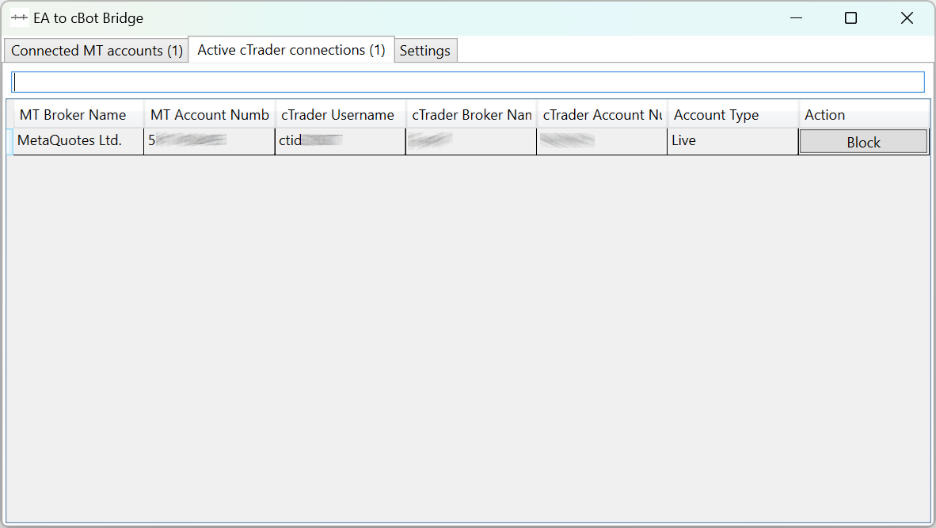
When you navigate to the “Active cTrader connections” tab, you’ll find a list of all clients who are currently connected and copying trades. This real-time display is vital for maintaining oversight and ensuring that only authorized users are benefiting from your trading signals. Each connection is accompanied by specific details that help in identifying and managing it effectively.
Identifying Connections by Key Parameters
To facilitate easy management, the “Active cTrader connections” tab includes several fields that provide comprehensive details about each active connection:
- MT Broker Name: This field shows the name of the broker used on the MT4/5 platform. It helps in identifying where the original trades are being executed.
- MT Account Number: This is the account number on the MT4/5 platform. It uniquely identifies the trader’s account from which the trades are being mirrored.
- cTrader Username: This field displays the username of the subscriber on the cTrader platform. It is crucial for identifying the individual who is copying the trades.
- Broker Name cTrader: This shows the broker’s name associated with the subscriber’s cTrader account. It ensures that the trades are being mirrored in a controlled and known environment.
- Account Number cTrader: This is the specific account number on the cTrader platform. It uniquely identifies the subscriber’s account where the trades are being replicated.
- Account Type: This field indicates whether the account is a demo or live account. This information is vital for understanding the context in which the trades are being copied.
Blocking and Unblocking Connections
One of the key features of the “Active cTrader connections” tab is the ability to block or unblock connections. This functionality is essential for maintaining control over who can access your trading signals.
- Blocking a Connection: If an unauthorized or suspicious connection is detected, you can quickly block it. This action immediately stops the transmission of trades to that particular connection, ensuring that only legitimate subscribers receive the signals.
- Unblocking a Connection: Conversely, if you need to reinstate access for a previously blocked subscriber, you can easily unblock the connection. This flexibility allows you to manage access dynamically based on changing circumstances and subscription statuses.
Conclusion
The “EA to cBot Bridge” offers a robust and efficient way to control access to your EA, ensuring that only authorized users can copy your trades. By utilizing the “Active cTrader connections” tab, signal providers can monitor all active connections in real-time, identify connections based on detailed parameters, and block or unblock connections as necessary. This comprehensive control mechanism is essential for protecting your trading strategies and maintaining the integrity of your signals.
In summary, the ability to manage access through detailed monitoring and control features ensures that the “EA to cBot Bridge” remains a secure and reliable tool for automated trading. By leveraging these controls, you can safeguard your trading operations and provide a trusted service to your subscribers.